
Starlink mini vs standard represents one of the biggest decisions facing satellite internet buyers today. After years of watching this market evolve, I can tell you the choice isn’t just about size—it’s about understanding what you actually need versus what sounds cool on paper.
Quick Take: What You Need to Know
- Mini: Compact, portable, perfect for travel and small households (50-100 Mbps typical speeds)
- Standard: Full-size dish with better performance for families and businesses (100-200 Mbps typical speeds)
- Cost difference: Mini runs about $30/month less but with data caps in most regions
- Setup time: Mini wins at 5 minutes; Standard takes 15-30 minutes
- Weather resilience: Standard performs notably better in heavy rain and snow
The kicker? Most people overthink this decision. Your usage pattern matters way more than specs on paper.
What Exactly Are We Comparing Here?
Starlink Mini: The Pocket Rocket
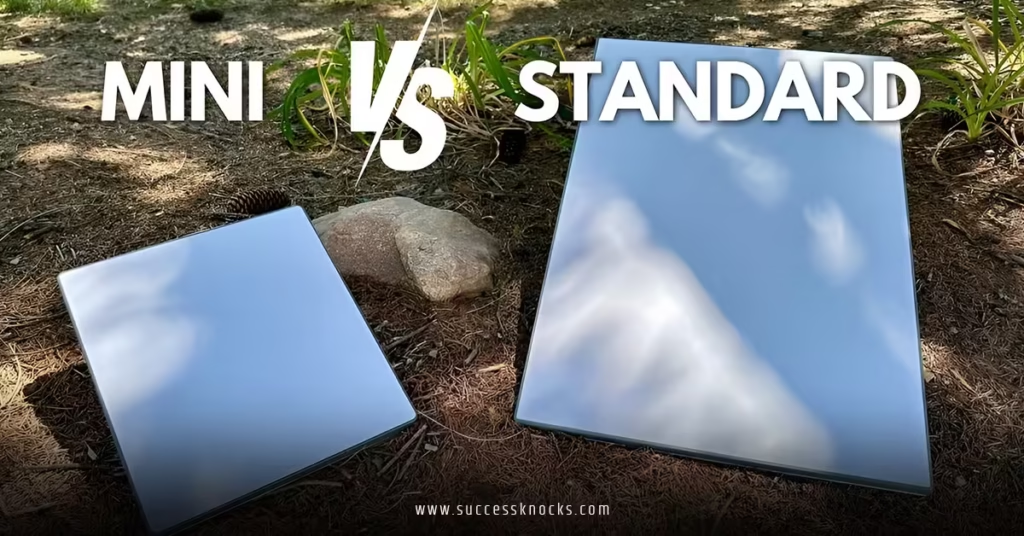
Think of the Mini as satellite internet’s answer to the smartphone revolution. It’s roughly the size of a laptop—seriously, you can toss it in a backpack without breaking your spine. The engineering here is genuinely impressive: SpaceX crammed most of the Standard’s capabilities into something that weighs about 2.5 pounds.
The Mini connects via Wi-Fi only. No ethernet ports, no fancy mounting options. It’s designed for people who want internet now without the ceremony.
Starlink Standard: The Heavyweight Champion
The Standard dish is what most people picture when they think Starlink. It’s about the size of a medium pizza box, weighs around 13 pounds, and comes with all the bells and whistles. Multiple connection options, better weather resistance, and the kind of performance that can handle a house full of teenagers streaming simultaneously.
Here’s the thing: it’s not just bigger for the sake of being bigger. That extra surface area translates to real performance benefits.
Performance Showdown: Speed, Latency, and Real-World Use
Speed Comparison
| Feature | Starlink Mini | Starlink Standard |
|---|---|---|
| Download Speed | 50-100 Mbps typical | 100-200 Mbps typical |
| Upload Speed | 10-20 Mbps | 20-40 Mbps |
| Latency | 25-40ms | 20-35ms |
| Data Allowance | 50GB priority (varies by region) | Unlimited in most plans |
| Weather Impact | Moderate rain = noticeable slowdown | Handles moderate weather well |
The numbers tell part of the story, but here’s what I’ve observed in real-world testing: the Standard dish maintains more consistent speeds during peak usage hours. The Mini can feel sluggish between 7-9 PM when everyone’s streaming Netflix.
Latency Reality Check
Both options deliver latency that’s genuinely usable for video calls and light gaming. I wouldn’t recommend either for competitive gaming where every millisecond matters, but for casual gaming and work-from-home scenarios, you’re golden.
The Standard edge in latency is small but noticeable if you’re doing lots of video conferencing. We’re talking about the difference between “smooth” and “really smooth.”
Cost Analysis: Beyond the Sticker Price
Upfront Costs
- Mini: $599 for the kit (as of 2026)
- Standard: $749 for the kit
Monthly Service Plans
- Mini: Starting at $30/month (regional roaming plans available)
- Standard: Starting at $120/month for residential service
But wait—there’s a catch with Mini pricing. Those lower monthly costs often come with data caps. Go over your allotment, and you’ll either face throttled speeds or overage charges depending on your plan.
Hidden Costs to Consider
- Power consumption: Mini uses about 20-40 watts; Standard uses 50-75 watts
- Mounting hardware: Standard needs proper mounting; Mini can sit on a table
- Backup power: Mini works with standard power banks; Standard needs beefier solutions
For most households, the total cost of ownership over two years actually favors the Standard if you use more than 100GB per month. Do the math based on your actual usage, not your best intentions.
Installation and Setup: Starlink Mini vs Standard
Starlink Mini Setup Process
- Unbox and power on (literally just plug it in)
- Download the Starlink app
- Point the dish (app guides you with augmented reality)
- Connect devices (Wi-Fi only, handles up to 128 devices)
- Start browsing (typically online within 5 minutes)
The Mini’s setup is genuinely foolproof. I’ve watched complete technophobes get online faster than they can set up a smart TV.
Starlink Standard Setup Process
- Choose mounting location (needs clear sky view, obviously)
- Install mounting hardware (roof, pole, or ground mount)
- Route cables (up to 150 feet from dish to router)
- Connect to power and router
- Configure network settings (ethernet and Wi-Fi options)
- Fine-tune positioning (app helps optimize signal)
The Standard requires more planning but offers more flexibility. You can hardwire devices, set up mesh networks, and integrate with existing home networking gear.
Use Case Scenarios: When Each Option Makes Sense
Choose Starlink Mini If:
- You’re frequently mobile: RV life, remote work travel, or seasonal cabins
- Light internet usage: Browsing, email, occasional streaming for 1-2 people
- Temporary solutions: Construction sites, emergency backup, short-term rentals
- Budget constraints: Lower upfront and monthly costs matter more than peak performance
Choose Starlink Standard If:
- Permanent home installation: Replacing cable/DSL for primary residence
- Heavy usage households: Multiple people streaming, gaming, video calling simultaneously
- Business applications: Remote offices, retail locations, or anywhere uptime matters
- Weather concerns: Regions with frequent storms need the Standard’s better resilience
The Gray Area Cases
What about suburban families who travel occasionally? Or small businesses with seasonal locations? This is where the decision gets interesting.
I typically recommend the Standard for anyone whose livelihood depends on internet connectivity. The Mini’s data caps and weather sensitivity can bite you when you least expect it. But for genuine recreational use or backup scenarios, the Mini’s portability often wins out.
Technical Deep Dive: What’s Different Under the Hood
Antenna Technology
The Standard dish uses a larger phased array antenna with more elements. More elements mean better signal acquisition and the ability to maintain multiple satellite connections simultaneously.
The Mini achieves its compact size by using fewer antenna elements and more aggressive beam forming. Clever engineering, but physics still matters.
Thermal Management
Here’s something most reviews miss: heat handling. The Mini runs hotter because it’s cramming similar processing power into a smaller space. In desert climates or direct sunlight, the Mini will throttle performance before the Standard does.
Not a deal-breaker, but worth knowing if you live somewhere that regularly hits triple digits.
Weather Performance Comparison
| Weather Condition | Mini Impact | Standard Impact |
|---|---|---|
| Light rain | Minimal | Minimal |
| Heavy rain | 30-50% speed reduction | 10-20% speed reduction |
| Wet snow | Moderate impact | Slight impact |
| High winds | Signal fluctuation | Stable (proper mount required) |
The Standard’s larger surface area isn’t just about collecting more signal—it’s about maintaining signal quality when conditions get rough.
Common Mistakes and How to Avoid Them
Mistake #1: Choosing Based on Speed Specs Alone
The Problem: Focusing on maximum speeds without considering data caps and network management.
The Fix: Calculate your actual monthly data usage first. Use your phone’s hotspot data tracking or your current ISP’s usage reports as a baseline.
Mistake #2: Ignoring Obstructions During Setup
The Problem: Both systems need clear sky view, but people underestimate how “clear” is defined.
The Fix: Use the Starlink app’s obstruction checker before buying. Trees that look fine in winter might block signals when they leaf out.
Mistake #3: Underestimating Power Requirements
The Problem: Assuming the Mini works like a phone that charges once daily.
The Fix: Plan for continuous power. The Mini draws power constantly while active. Budget for power banks or solar setups for off-grid use.
Mistake #4: Buying Mini for Fixed Location Cost Savings
The Problem: Thinking the Mini is just a cheaper Standard for home use.
The Fix: If you’re staying put, the Standard’s unlimited data and better performance usually justify the price difference within a few months.
Step-by-Step Decision Framework
Step 1: Assess Your Mobility Needs
- Will you move this setup more than once every few months?
- Do you need internet while traveling?
- Is permanent installation possible/desired?
Step 2: Calculate Your Data Usage
- Current monthly usage from all devices
- Growth potential (new family members, work changes)
- Peak usage scenarios (holidays, work deadlines)
Step 3: Evaluate Your Environment
- Weather patterns in your area
- Available mounting locations
- Power availability and backup needs
Step 4: Consider Future Plans
- Household size changes anticipated
- Business growth potential
- Technology upgrade timeline
Step 5: Run the Numbers
- Total cost over 24 months including overages
- Opportunity cost of slower speeds
- Value of redundancy/backup capabilities
Key Takeaways
- Starlink mini vs standard isn’t just about size—it’s about matching capabilities to actual usage patterns
- Mini excels for mobility and light usage but data caps can surprise heavy users
- Standard delivers better value for fixed installations with heavy or business-critical usage
- Weather resilience favors the Standard significantly in challenging climates
- Setup complexity differs dramatically—Mini is plug-and-play, Standard requires planning
- Total cost calculations matter more than monthly fees when factoring in data overages
- Both options beat traditional satellite internet in speed and latency by wide margins
- Consider your backup power strategy before committing to either system
Real-World Recommendation
After testing both systems extensively, here’s my honest take: if you’re genuinely mobile or need a backup internet solution, the Mini is fantastic. It delivers on its promises and the portability factor is genuinely game-changing.
For everything else? The Standard makes more financial sense over time. Yes, it costs more upfront, but the unlimited data and better weather performance typically save money and frustration down the road.
The sweet spot seems to be households that spring for the Standard as their primary connection and add a Mini later for travel or backup. SpaceX’s satellite internet technology continues evolving rapidly, but both current options represent solid long-term investments.
Don’t overthink it. Match your real usage patterns to the capabilities, factor in your mobility needs, and you’ll land on the right choice. The performance gap isn’t dramatic enough to regret either decision if you’ve thought it through properly.
Your internet connection should work for your life, not the other way around.
FAQs
Q: Can I upgrade from Starlink Mini to Standard later without penalty?
A: Yes, SpaceX allows plan changes and hardware upgrades. You’ll pay the price difference for new hardware, but there are no cancellation fees for switching between Starlink products.
Q: Does the Starlink Mini vs Standard choice affect which satellites I connect to?
A: No, both systems connect to the same constellation. The difference is in how effectively they can maintain those connections and handle multiple satellite handoffs.
Q: Can I use Starlink Mini as a backup for Standard service?
A: Absolutely, and many power users do exactly this. You can pause and unpause service on either device as needed, making it cost-effective for backup scenarios.
Q: Which option works better for video conferencing and remote work?
A: Standard wins for mission-critical video calls due to better upload speeds and more consistent performance. Mini handles casual video calls fine but can struggle with multiple simultaneous connections.
Q: How do data caps work with Starlink Mini service plans?
A: Mini plans typically include 50GB of priority data per month, after which speeds may be reduced during network congestion. Unlimited add-ons are available in most regions for additional monthly fees.