Remote Work Productivity Hacks for Parents delivers the edge you need when juggling deadlines, school runs, snack demands, and that ever-present mental load. Working from home with kids in the mix isn’t about working more hours. It’s about working smarter in the pockets of time you actually control.
Parents who master these hacks reclaim hours, slash stress, and still show up fully for their families. Here’s exactly how they do it in 2026.
- Front-load deep work during your quietest hours (often before the house wakes up).
- Build kid-proof boundaries and micro-routines that protect focus without guilt.
- Leverage simple tools and batching to cut context switching.
- Prioritize energy management over pure time management.
- Deliver visible results so flexibility becomes your superpower, not a negotiation.
These tactics work whether you have toddlers, school-age kids, or teens. The secret? Stop trying to separate work and life perfectly. Instead, integrate them with intention.
Why Most Working Parents Struggle With Remote Productivity
The blur hits hard. One minute you’re crushing a report, the next you’re mediating a sibling war or answering “I’m bored” for the tenth time.
Many remote parents end up working longer hours just to compensate. Burnout follows. Yet those who thrive treat productivity as a system built around family realities, not against them.
The kicker is this shift changes everything. You stop surviving summer breaks or school holidays and start owning them.
Core Hacks That Actually Move the Needle
Wake up earlier than the kids. Even 45-60 minutes gives you uninterrupted focus time for your highest-value tasks. Shower, coffee, then dive in. Many parents report this single habit doubles their effective output before chaos begins.
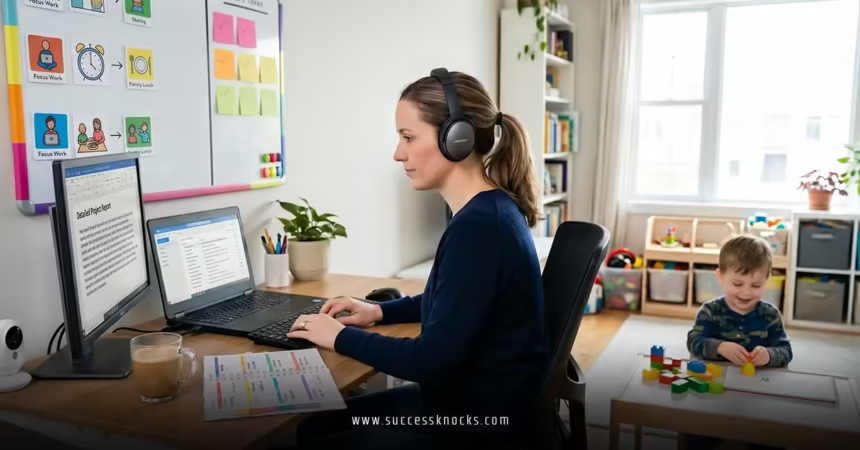
Claim a dedicated workspace. Not a fancy office—just a consistent spot with clear signals. Headphones on? Door closed? Kids learn it means “Dad/Mom is at the office.”
Master time-blocking with family in mind. Block your calendar visibly. Protect your peak energy hours. Slot buffer time for the inevitable interruptions.
Batch the small stuff. Emails, Slack, admin tasks all get one or two dedicated windows. No more constant switching that kills momentum.
Use the Pomodoro Technique adapted for parents. 25 minutes focused work, 5-minute reset. During breaks, stretch, play quick with the kids, or step outside. It prevents the all-day grind feeling.
Step-by-Step Action Plan for Busy Parents
- Audit one week. Track your energy, interruptions, and actual deep work. Spot the patterns.
- Set non-negotiable blocks. Morning focus, core collaboration hours, and shutdown time.
- Communicate expectations. Share your schedule with your manager and family. Be specific about availability.
- Build kid routines. Independent play stations, screen-time agreements, or summer activity blocks that align with your meetings.
- Review and tweak Sundays. What drained you? What worked? Adjust fast.
- Protect recovery. Real evenings off and one weekly “no work” buffer.
What I’d do starting tomorrow: Front-load my two hardest tasks before 9 AM, batch all messaging to 11 AM and 4 PM, and enforce a hard 6 PM laptop close.
Remote Work Productivity Hacks Comparison Table
| Hack | Beginner Version | Advanced Version | Real Impact |
|---|---|---|---|
| Morning Routine | Wake 30 min early | 60+ min + exercise + planning | 2x deep work before distractions |
| Task Management | Basic to-do list | Time-blocking + Eisenhower matrix | Fewer dropped balls, less stress |
| Interruptions | “Just quick” help | Visual signals + kid activity rotations | Protected focus blocks |
| Energy Management | Coffee all day | Movement breaks + hydration + real meals | Sustained output, less burnout |
| Tools | Phone notes | AI summarizers, focus apps, shared family calendars | Cut admin time by 30-50% |

Common Pitfalls and Quick Fixes
Pitfall 1: Trying to be always available. Fix it by setting clear core hours and communicating results over presence.
Pitfall 2: No transition rituals. You finish a call and immediately help with homework. Fix: 2-minute walk or change of shirt between modes.
Pitfall 3: Guilt over “not enough” family time. Fix: Quality micro-moments beat guilty multitasking. Be fully present during designated family slots.
Pitfall 4: Ignoring your own needs. Fix: Treat self-care like a work meeting—non-negotiable.
For deeper strategies on protecting your time when school’s out, check out setting boundaries for remote work during summer break. It pairs perfectly with these hacks.
Pro-Level Moves for 2026
Leverage AI tools for meeting notes, email drafting, and task prioritization. They free mental space fast. Experiment with hybrid flexibility—some parents crush it by shifting hours around school schedules.
Track wins weekly. Share them in team updates. Visibility builds trust and defends your setup.
External resources worth your time:
- Gallup insights on hybrid work for parents
- FlexJobs remote parent guides
- Upwork productivity resources
Key Takeaways
- Remote work productivity for parents starts with energy, not just hours.
- Front-load important work and protect those blocks ruthlessly.
- Kids respect boundaries when they’re consistent and visual.
- Batching and tools slash context switching dramatically.
- Results talk louder than green Slack dots.
- Recovery time is productivity fuel—don’t skip it.
- Review weekly; small adjustments compound fast.
- Done right, you get more done and more real family time.
Remote work gives parents a real shot at balance, but only if you build the system. Start with one or two hacks this week. Pick the ones that solve your biggest current pain. Momentum builds from there.
You’ll end up more present at home and sharper at work. That’s the win worth chasing.
FAQs
How can parents stay productive with young kids at home during remote work?
Front-load deep tasks before they wake, create activity rotations or stations, and use visual boundary signals. Consistency trains everyone faster than you expect.
What are the best tools for remote work productivity as a parent?
Focus apps like Freedom or Forest, shared family calendars (Google or Outlook), AI note-takers for meetings, and simple timers for Pomodoro sessions. Keep the stack minimal.
Does setting boundaries really boost productivity for working parents?
Yes. Clear lines reduce decision fatigue and resentment. When you know exactly when work ends, you focus harder during work time and recharge fully afterward—leading to better overall output.