By using this site, you agree to the Privacy Policy and Terms of Use.
Accept
Success Knocks | The Business MagazineSuccess Knocks | The Business MagazineSuccess Knocks | The Business Magazine
Notification Show More
  • Home
  • Industries
    • Categories
      • Cryptocurrency
      • Stock Market
      • Transport
      • Smartphone
      • IOT
      • BYOD
      • Cloud
      • Health Care
      • Construction
      • Supply Chain Mangement
      • Data Center
      • Insider
      • Fintech
      • Digital Transformation
      • Food
      • Education
      • Manufacturing
      • Software
      • Automotive
      • Social Media
      • Virtual and remote
      • Heavy Machinery
      • Artificial Intelligence (AI)
      • Electronics
      • Science
      • Health
      • Banking and Insurance
      • Big Data
      • Computer
      • Telecom
      • Cyber Security
    • Entertainment
      • Music
      • Media
      • Gaming
      • Fashion
      • Art
    • Business
      • Branding
      • E-commerce
      • remote work
      • Brand Management
      • Investment
      • Marketing
      • Innovation
      • Vision
      • Risk Management
      • Retail
  • Magazine
  • Editorial
  • Contact
  • Press Release
Success Knocks | The Business MagazineSuccess Knocks | The Business Magazine
  • Home
  • Industries
  • Magazine
  • Editorial
  • Contact
  • Press Release
Search
  • Home
  • Industries
    • Categories
    • Entertainment
    • Business
  • Magazine
  • Editorial
  • Contact
  • Press Release
Have an existing account? Sign In
Follow US
Success Knocks | The Business Magazine > Blog > News > Microsoft’s Big Windows Update: What You Need to Know
News

Microsoft’s Big Windows Update: What You Need to Know

Last updated:
Lisa Camara
Published:
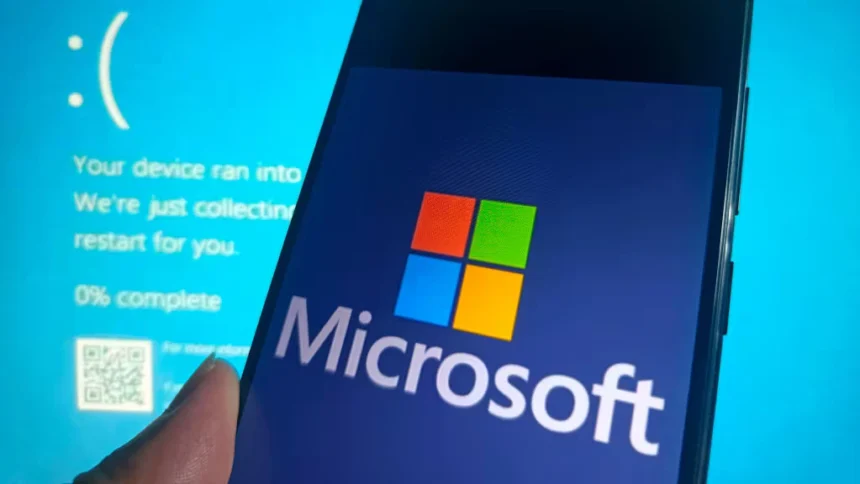
Microsoft Windows security update

Microsoft Windows security update

Microsoft is shaking things up with a massive update to the Windows operating system, and it’s got everyone talking. Set to launch in the coming months, this update promises to address some of the biggest pain points for Windows users, such as those dreaded system crashes. From a major security overhaul to a friendlier Blue Screen of Death (BSOD), here’s everything you need to know about this exciting change.

Contents
  • Microsoft Windows security update
  • What’s Changing in Windows?
  • Why This Update Matters
  • How Does It Stack Up to Past Updates?
  • The Pros and Cons
  • Conclusion

What’s Changing in Windows?

Microsoft is moving antivirus and EDR tools out of the Windows kernel and relocating them to user mode for enhanced system stability and security. For years, these security tools have lived deep inside the kernel to fight off malware and cyber threats. But that deep access came with a catch: it sometimes caused system instability, like the infamous CrowdStrike outage in 2024.

This update flips the script. By moving security software to user mode, Microsoft aims to stop crashes before they start while keeping your device safe. But that’s not all—they’re also rolling out:

  • Quick Machine Recovery (QMR): A new feature to get your PC back on its feet faster after a crash.
  • A Redesigned BSOD: The Blue Screen of Death is getting a makeover to be less terrifying and more helpful.

Why This Update Matters

This isn’t just another patch—it’s a seismic shift in how Windows handles security. For decades, security tools have relied on kernel access, but that’s led to trade-offs in stability. By prioritizing reliability, Microsoft could cut down on those frustrating BSOD moments that ruin your day.

Plus, this move could spark a wave of innovation in cybersecurity. Vendors will need to rethink their tools for the user mode setup, potentially leading to smarter, more efficient ways to protect your PC.


How Does It Stack Up to Past Updates?

Windows updates usually bring shiny new features or performance boosts, but this one digs deeper. It’s a structural change, rewriting the rules for security software. Think of it like the jump from Windows 7 to Windows 8—a bold move with big implications.

Unlike the Windows 8 interface overhaul (which didn’t win everyone over), this update’s focus on stability and security is likely to get a warm welcome. Who doesn’t want fewer crashes and a smoother experience?


The Pros and Cons

Benefits

  • Rock-Solid Stability: No more crashes from glitchy security software—your PC should run like a dream.
  • Next-Level Security: A new framework could unlock cutting-edge threat protection.
  • Faster Fixes: Quick Machine Recovery means less downtime when things go wrong.

Drawbacks

  • Adjustment Period: Some security vendors might lag in adapting, leaving gaps in protection temporarily.
  • Performance Questions: Tools might need extra juice to work without kernel access, possibly slowing things down.

Conclusion

Microsoft’s latest Windows update is a game-changer, moving security tools out of the kernel to boost stability and reliability. With extras like Quick Machine Recovery and a revamped BSOD, it’s clear they’re listening to user frustrations. While security vendors might face a learning curve, the payoff could be a safer, smoother Windows experience.



Similar Articles: successknocks.com

Nashville Music Venues for Live Performances: Your Gateway to Musical Magic
Accounting Software for Multiple Businesses: The Smart Way to Juggle Clients Without Losing Your Mind
Furnace Maintenance Checklist: Keep Your Heat Running Strong All Winter
Client onboarding frameworks for high-ticket services
Xebia: Operating Worldwide to Provide Innovative IT Consultancy Through Over 5500 Consultants
TAGGED:#cybersecurity#technews#Windowsmicrosoftsuccessknocks
Popular News
How to Network at LEAP East Hong Kong 2026 (July 8-10)
Business & FinanceTech And AI

How to Network at LEAP East Hong Kong 2026 (July 8-10)

Ava Gardner
Nvidia’s Q4 2025 Earnings: A Deep Dive into the AI Powerhouse’s Performance
Black-Owned Brands USA: Spotlight on Powerhouses Driving 2026 Trends
Magnolia Blossom Festival Arkansas 2026: Your Ultimate Guide to This Southern Gem
Managing PTO Requests for Summer Vacations Effectively
- Advertisement -
Ad imageAd image

advertisement

About US

SuccessKnocks is an established platform for professionals to promote their experience, expertise, and thoughts with the power of words through excellent quality articles. From our visually engaging print versions to the dynamic digital platform, we can efficiently get your message out there!

Social

Quick Links

  • About Us
  • Contact
  • Blog
  • Advertise
  • Editorial
  • Webstories
  • Media Kit 2026
  • Privacy Policy
© SuccessKnocks Magazine 2025. All Rights Reserved.
Welcome Back!

Sign in to your account

Username or Email Address
Password

Lost your password?